How to remove metadata from a PDF before you send it
A PDF keeps a small personnel file on itself. It records who made it, what software wrote it, when it was created and last touched, and a title, author, and subject that someone typed months ago and forgot about. None of it appears on the page, which is the problem: the file is telling a story about you that the recipient never asked to hear. You can remove metadata from PDF files in a couple of minutes once you know where it lives, and the reason to bother is that the Author field is very often a real name or a computer username.
What a PDF remembers
A PDF built to the ISO 32000 standard can carry a document information dictionary: a short list of plain key-and-value pairs written into the file. The usual keys are:
- Title, Author, Subject, Keywords: whatever the creating app captured, or whatever the person typed.
- Creator: the program that produced the original document, often a word processor or a design app.
- Producer: the library or tool that converted it into a PDF.
- CreationDate and ModDate: timestamps down to the second, usually in UTC.
The list is short but specific. "Creator: Microsoft Word 2019" plus "Producer: Adobe Acrobat 2023" describes your software stack exactly, and the dates fingerprint when the drafting happened.
The second copy: XMP
Most modern PDFs carry a second metadata store as well, called XMP (Extensible Metadata Platform). XMP is an XML packet embedded in the file, and it mirrors the same facts under its own names: dc:creator, xmp:CreatorTool, pdf:Producer, creation and modification dates. It can also hold custom namespaces a vendor added, and PDF/A files require it. The two stores are written at different times by different tools, so they often disagree; a thorough check reads both. The PDF Association's write-up on PDF forensics covers how examiners treat this layer of a file.
How to see it before you send
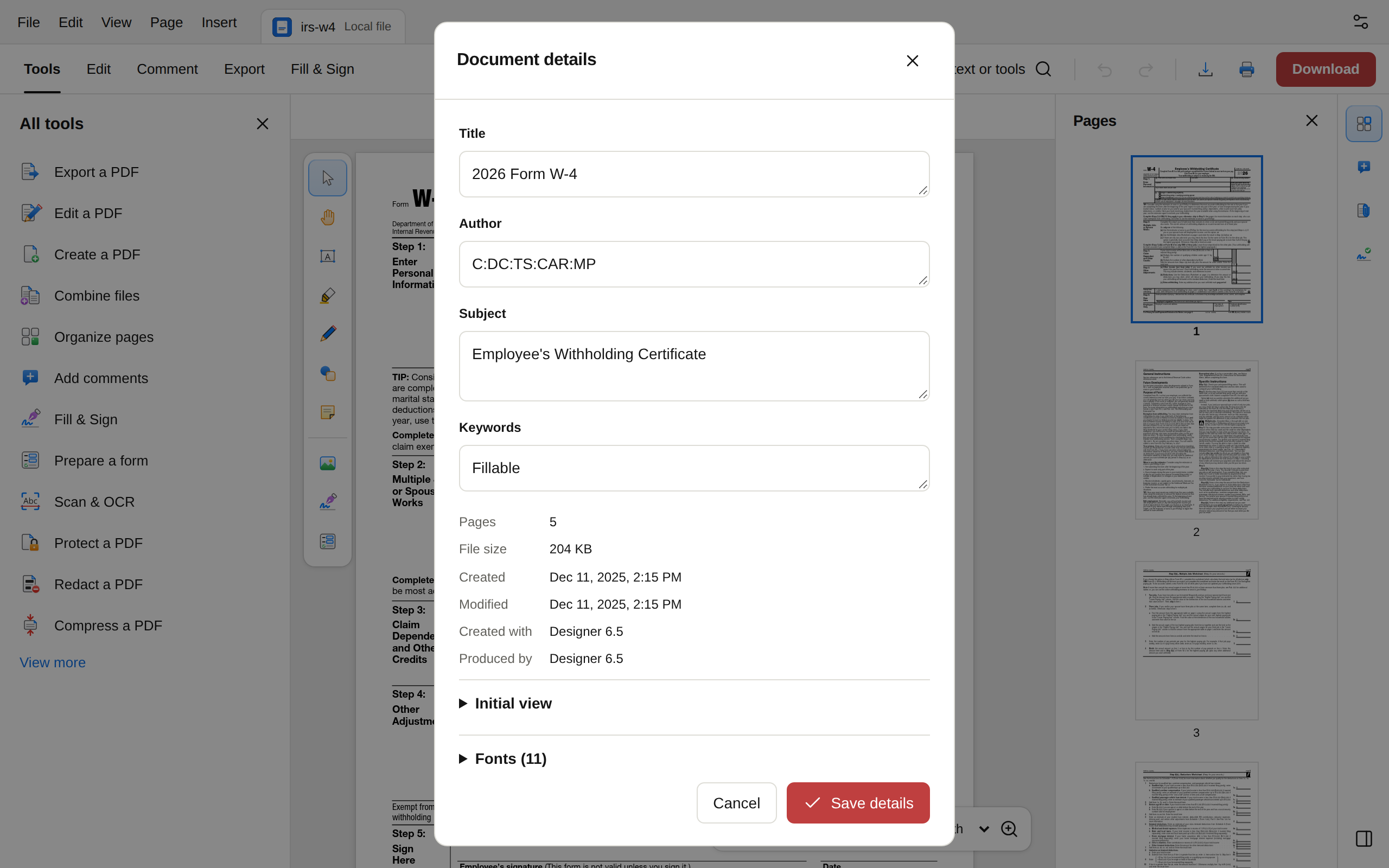
Three routes, from quickest to most thorough.
Open the properties dialog. Every desktop reader has one. In Acrobat and Reader it is File > Properties (Ctrl/Cmd+D), and the Description tab lists Title, Author, Subject, and Keywords, then Created and Modified, plus the app that made the file. Nothing is hidden behind this dialog; it is just showing you what was always there.
Or just open it in LivePDF. The editor reads the same fields, and its cleanup dialog (next section) lists exactly what it found before you commit to removing anything. It runs in the browser, so inspecting a file does not mean uploading it.
Ask the command line. pdfinfo file.pdf prints Title, Author, Subject, Keywords, Creator, Producer, CreationDate, ModDate, page count, and a "Custom Metadata" line showing whether XMP is present; the pdfinfo manual lists every field it can return. For a fuller picture, exiftool file.pdf shows the Info dictionary and the XMP packet side by side. On an unencrypted file, strings file.pdf | head sometimes shows the dictionary sitting in the raw bytes in plain text.
Why the Author field matters
Of all the fields, Author causes the most trouble, because it usually gets filled in without anyone deciding to fill it in. Office and many other apps default it to the licensed user or the machine's account name, so a file made on a work laptop can go out to a client, a court, or a public archive carrying "jmartinez" or a full employee name. From a stack of published PDFs, that is enough to sketch an internal org chart; Outpost24 documented the harvesting technique in Metadata: hackers' best friend.
Court filings have their own history here, though the famous cases were about hidden text rather than metadata. In November 2018, Paul Manafort's legal team filed a response with sections blacked out in a word processor before export; selecting the black areas and pasting recovered the covered allegations (BBC). In March 2005, the US Army's report on the checkpoint killing of Italian intelligence officer Nicola Calipari went out with black boxes over names and procedures, and readers copied the text out from under them; Judge Herbert B. Dixon Jr. later cataloged cases like these for the American Bar Association. The lesson carries across: an invisible layer in a public document is still public, and metadata is that layer's quieter relative. For the full anatomy of those failures, the black-box case studies go deeper.
What to remove and what to keep
Stripping everything is not always right. A few fields are worth keeping on purpose.
- Title: worth keeping, and worth setting yourself, so the file searches and files sensibly.
- Author: keep it only if attribution is the point. For a company document, set it to the organization rather than an individual; for anything personal, clear it.
- Subject and Keywords: keep them if your filing system or search depends on them.
- Accessibility and PDF/A metadata: some XMP carries the title and language that screen readers and archivists rely on. If the file needs long-term storage or accessibility, do not strip blindly.
- Signatures: cleanup rewrites the file, which can invalidate a digital signature. Never sanitize a signed contract after signing.
The fields to clear without a second thought are Creator, Producer, and the two dates, which reveal your software and your timeline rather than anything the reader needs.
Strip metadata in LivePDF
Load the file in LivePDF, open the Redact a PDF tool (in the Protect & Standardize group), and choose Remove hidden information… from its menu — the same cleanup the metadata tool page describes. A dialog lists what can go, each with a checkbox: Document metadata (author, title, XMP) is checked by default, alongside scripts, links and actions, file attachments, embedded thumbnails, the search index, web-capture data, and hidden text. Leave metadata checked, drop anything the document genuinely needs, and press Remove. Under the hood the tool rebuilds the document clean, then tells you so: "Hidden information removed. Save or download to keep the cleaned file." The download never left your machine.
Then verify: reopen the saved copy and confirm the Author, Creator, and Producer fields are empty.
Where metadata removal stops
Metadata cleanup is one layer, and people regularly mistake it for a complete one.
Removing metadata does not remove content. If page 4 of a bank statement still shows a card number, a clean Info dictionary does not make the number safe. That is a redaction job, where the text is deleted from the file rather than re-described.
Metadata removal is also not encryption. A password controls who can open the file. If the file has an open password, the metadata is encrypted with everything else, so you have to open it before you can strip anything; if it only carries permission flags, the metadata is readable and removable without a password. Checking whether a PDF is encrypted tells you which situation you are in, and how to password-protect a PDF covers the encryption side.
Two last places metadata hides that a PDF-level strip will not reach. Images embedded in the file can carry their own EXIF data, which survives inside the page content, so pulling images out of a PDF and checking them separately is worth doing for photo-heavy documents. And if the file is a scan, the OCR text layer is content, not metadata: scrubbing the Info dictionary does nothing about words that were recognized and hidden under the image.
The short version
Look before you send. Open Properties, run pdfinfo, or open the file in LivePDF — Document details… lists what the Author, Creator, Producer, and date fields actually say. Clear the machine-generated ones, keep the human ones only when they are meant to be there, and leave signatures and archival metadata alone. Metadata removal cleans up what the file says about you, redaction handles what is inside it, and encryption handles who can open it.
The bigger picture - where your file goes when you use an online tool, and how to verify claims yourself - is the subject of PDF privacy and local processing.
Sources and further reading
- Outpost24: Metadata, hackers' best friend, on harvesting Author and Creator fields from public PDFs.
- PDF Association: PDF Forensics & the Metadata Conundrum, on how examiners treat Info and XMP.
- pdfinfo manual page, the full field list.
- BBC: Failed redaction reveals Paul Manafort's 'lies to FBI', the November 2018 filing.
Word count: ~1,490 (body).
FAQ
What metadata does a PDF contain?
At minimum a document information dictionary with Title, Author, Subject, Keywords, Creator, Producer, and creation and modification dates. Most modern files add an XMP block that mirrors those fields and can carry custom namespaces. The Author field is the one that most often holds a real name or an operating-system username.
Does removing metadata change how the PDF looks?
No. Stripping metadata rewrites how the file describes itself, not what is drawn on the page. The text, images, and layout are untouched. That is also why it is a different operation from redaction, which removes content rather than re-describing it.
Can I remove metadata from a PDF that needs a password?
If the file has an open password, you have to open it first, because the metadata sits inside the encrypted content. With a permissions-only file the content is not encrypted, so tools can read and rewrite the metadata without any password at all.