Redaction failures: the black box hides nothing
A black rectangle drawn over a paragraph looks like the end of a secret. In a PDF it is often not even a speed bump. The text underneath stays put, as selectable as anything else on the page, and a quick copy-paste brings it back whole. That single fact is behind every redaction failure on record: undone court filings, a military report, and the careers of people who should have known better.
The black box is a convincing lie, and it keeps being told because it looks so final. Two documented cases show how completely it can fail.
Manafort's filing, January 2019
Paul Manafort, Donald Trump's former campaign chairman, was working through a plea deal with Special Counsel Robert Mueller over his Ukraine consulting. In November 2018 Mueller's team accused him of lying to investigators, and Manafort's lawyers filed a response defending their client. By the time that response became public in January 2019, large sections of it had arrived blacked out.
The black was not redaction. Anyone who opened the public copy and copied the passage under the black bands got the text back, and reporters did exactly that. BBC News reported that the recoverable passages included the heart of the government's case: that Manafort had lied about sharing 2016 campaign polling data with Konstantin Kilimnik, about meeting him in Madrid, and about discussing a Ukraine peace plan while he was running the Trump campaign.
Nothing in Manafort's legal defense turned on the bad redaction. What collapsed was the intent to keep those details quiet until the lawyers chose otherwise. The mechanism was so simple that the word "hack" does not apply. The team blacked out text in a word processor, exported to PDF, and shipped the file with the text still inside it.
The Calipari report, spring 2005
Fourteen years earlier, the same mistake hit a military report with real consequences.
In March 2005, Nicola Calipari, an Italian military intelligence officer, was shot and killed at a US checkpoint on the road to Baghdad airport while escorting the newly freed journalist Giuliana Sgrena. The shooting strained US-Italian relations, and at the end of April the US military released a 42-page report on it as an electronic document.
The electronic copy had names and whole paragraphs "slashed out, blacked out." NPR's reporting described what happened next plainly: users "with basic computer training were able to take that file, transfer it to another program in which case all of the black slashes would disappear and the original appeared."
The recovered material included the names of the soldiers involved and, worse for the Pentagon, the rules of engagement at the checkpoint, assessments of troop training and vulnerabilities, and details of what the military knew about insurgent tactics. The military intended to release the report only in hard copy, because moving paper around Baghdad was dangerous, and turned to a digital file for safety. The file leaked more than the paper would have. A Pentagon spokesman called it a technical error and an unfortunate security breach.
Why a black box hides nothing
A PDF page is not a picture. It is a content stream: a list of instructions that say "place these characters at these coordinates," "draw a filled rectangle here," and so on. Text is stored as text, with a font, a position, and an encoding that lets it be copied and searched. A black rectangle is one more instruction that paints a filled path over an area. It is drawn on top. It does not touch what came before it.
So the letters stay in the file, in reading order, fully searchable. Any tool that ignores or strips the rectangle (a plain text extractor, a copy into a document, a different viewer) returns the original. Even the paragraph structure usually survives, because the content stream still knows where each glyph goes. There is a whole family of these lingering layers, from text under images to deleted-but-present content, which is worth understanding on its own: see hidden information in PDFs.
Word processors make the mistake easier to make. The instinct is to select the sensitive text, set its highlight or fill to black, and export. The black is a formatting attribute; the export faithfully carries the text into the PDF, where it waits under the color. This is why the Manafort and Calipari failures happened, and why neither was the last.
The pattern has a name and a literature
Judge Herbert B. Dixon Jr., a retired judge of the Superior Court of the District of Columbia, wrote a column for the ABA's Judges' Journal in 2019 titled "Embarrassing Redaction Failures," cataloguing case after case where courts, lawyers, and agencies published documents they believed were redacted. He had written about the same problem years earlier, which tells you how little the advice moved.
The rules governing federal filings are about what to redact, not how. Under Federal Rule of Civil Procedure 5.2, filings must mask Social Security numbers, dates of birth, financial account numbers, minors' names, and (in criminal cases) home addresses, as summarized in the US Courts privacy policy. The rule is precise about the identifiers. It says nothing about the black box, which is why a filing can comply with the letter of 5.2 and still leak everything inside it.
That gap is the whole problem. The regulation assumes the redaction itself works. The incidents show that the most common method of marking a document does not.
How to test whether a redaction held
You cannot tell by looking. The good news is that five minutes of poking will tell you the truth, and you can do it on any PDF, on any platform.
- Try to select under the box. Open the document and drag the cursor across the black area. If text highlights, even faintly, it is not redacted.
- Search for the term. Press Ctrl+F (Cmd+F on a Mac) and type what should be gone (a name, an account number). If the viewer jumps to a hit on the page, the text is there.
- Copy the page. Select the whole page, copy, and paste into a plain-text editor. The black box does not travel with the clipboard.
- Export to text. Any "convert to text" or "export" path will pull the underlying characters out.
- Check the metadata separately. Author, title, and the software that made the file can survive even a real redaction, which is a separate cleanup job: removing metadata from a PDF.
The same trap applies to white-out tools. A white rectangle over black text is the same lie in a different color, and it fails the identical tests: white-out in a PDF hides pixels, not data.
What a real redaction has to do
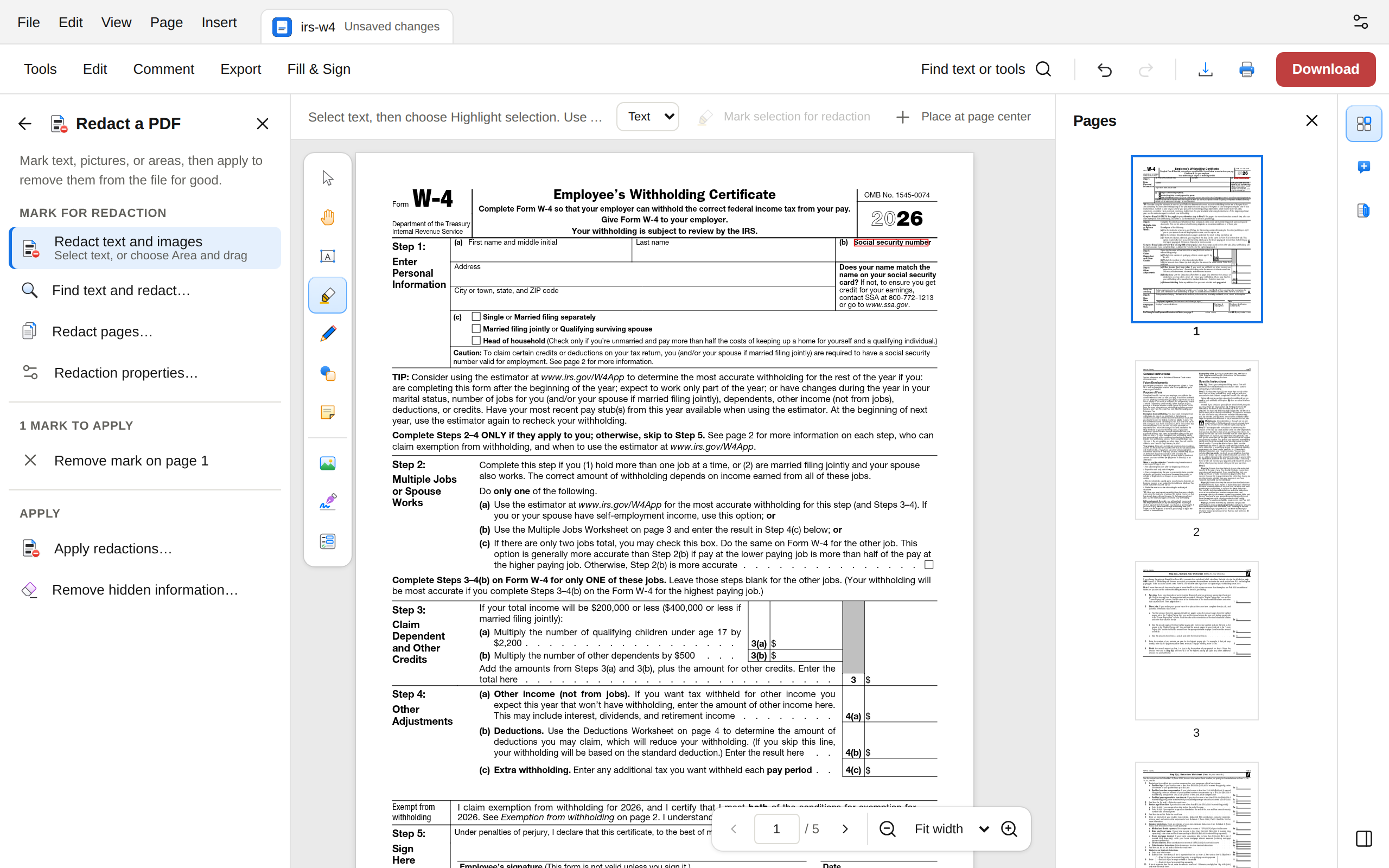
Real redaction removes the content. Not covers, not hides, not marks. The characters and images under the marked area must be deleted from the page content, so that nothing remains to copy, search, or extract. That is the difference between "the reader cannot see it" and "it is not there." LivePDF's redaction tool works this way — the apply step rewrites the page content — and the step-by-step redaction guide walks through it.
The vocabulary for this comes from data sanitization. NIST SP 800-88, the federal guidelines for media sanitization, distinguishes logical removal that leaves no recoverable copy from steps that only obscure it, and calls for verification that the removal worked. A black rectangle is neither clearing nor purging. The data was never sanitized; it was decorated.
A complete job also handles the surrounding data. Metadata can name the author or the machine that produced the document, tracked changes and comments can carry earlier drafts, and attachments can smuggle out a clean copy of exactly what you removed. Delete the content first, then scrub metadata, comments, and attachments, then re-run the tests above before you send anything. Our redaction workflow guide walks the whole sequence.
Tools that do this correctly exist. LivePDF's redact command removes the text, images, and drawings under each mark instead of covering them, and can strip hidden information such as metadata and attachments on save. The tool matters far less than the test, though. Whatever you used, try to recover the content yourself. If you cannot, no one else can either.
And be clear about what encryption is not. A password controls who can open a PDF; it removes nothing from inside. A permissions password that blocks copying is an advisory request that many viewers simply ignore, so it cannot stand in for redaction: what password protection does and does not do.
The black box is not a redaction technique. It is a drawing. Once you know that, the failures stop being mysterious and start being findable, which is the only part that matters.
Sources and further reading
- BBC News: Failed redaction reveals Paul Manafort's 'lies to FBI' (8 January 2019)
- NPR: Technical Error Reveals Classified Info on Death of Italian Agent (2 May 2005)
- ABA Judges' Journal, Judge Herbert B. Dixon Jr.: Embarrassing Redaction Failures (1 May 2019)
- US Courts: Privacy policy for electronic case files
- NIST SP 800-88 Rev. 1: Guidelines for Media Sanitization
Word count: 1,580
FAQ
Why is a black box over text not redaction?
Because the text is still there. A black rectangle is only another object drawn on top of the page; the letters underneath stay in the PDF's text layer, so copying, searching, or extracting the file recovers them.
How do I check whether a redaction actually worked?
Open the PDF, try to select the text under the box, and run Ctrl+F for the hidden term. If the text highlights or the search finds it, the box hid nothing.
What must a real redaction do?
Remove the content instead of covering it. It deletes the text, images, and drawings from the page, then scrubs the related data such as metadata, comments, and attachments.