Blog › Privacy & local processing
PDF versions explained: what 1.7 vs 2.0 actually changes
Open any PDF in a text editor and the very first bytes are something like %PDF-1.7 or %PDF-2.0. That line is the file's version number, and PDF versions cause a surprising amount of confusion for what is essentially one sentence of metadata. The number is not a branding stamp and not a quality grade. It is a promise about which features the file may use: a file marked 1.4 is telling every viewer "expect nothing newer than PDF 1.4 features," and a file marked 2.0 is telling viewers it may lean on anything in the 2017 edition of the standard.
Understanding that one idea explains almost everything else, including why files from 1996 still open without complaint and why an archiving office cares about the number while you probably do not.
What the number actually promises
A PDF file is a container plus a vocabulary of operators. The version number says which edition of that vocabulary is in play. If a file declares 1.4, it is promising it contains no transparency groups, because transparency arrived in 1.4 and the file is at most that. If it declares 1.5 or later, it is allowed to use layers and compressed internal structures. A viewer reads the number and knows what it must be prepared for.
Two consequences follow. First, the version number can only be a floor on what the viewer needs, never a ceiling: a viewer that fully supports PDF 2.0 can render a 1.0 file, because everything in 1.0 is also in 2.0. Second, the number tells you nothing about how good the document is. A sloppy scan saved as 2.0 is still a sloppy scan.
The timeline, in plain terms
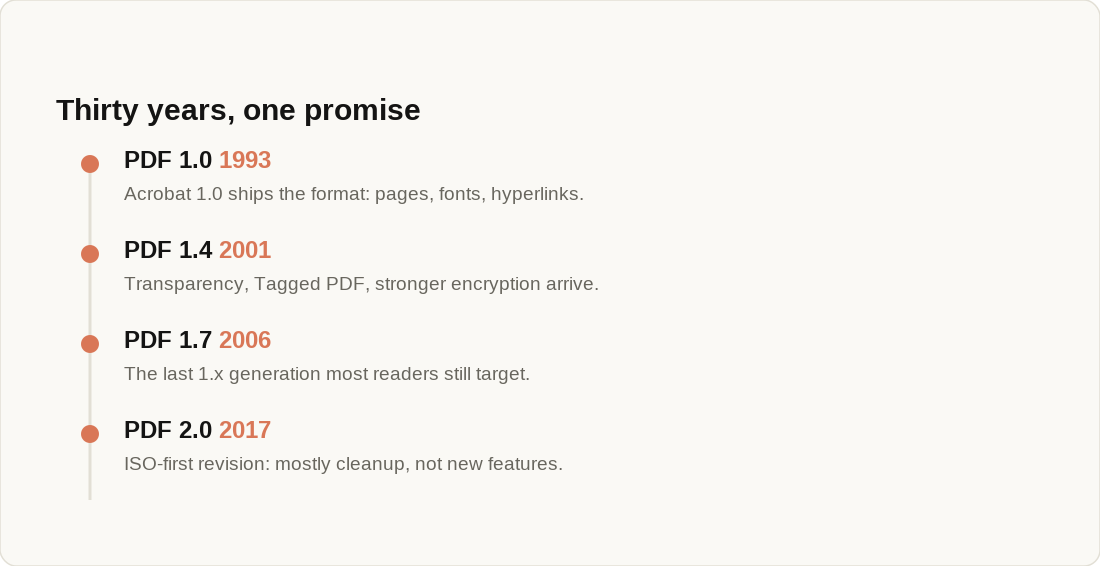
The full changelog spans thousands of pages of ISO prose. What follows is the highlights tour.
1.0 through 1.3 (1993 to 2000). The founding era. Adobe invented the format and shipped the core model most files still use: pages, embedded fonts, hyperlinks, annotations, form fields, JavaScript, digital signatures, and the first encryption. Nearly every concept a PDF user touches today existed by 2000. (Why Adobe built it, and what problem it was solving, is its own story — who invented the PDF covers the origin.)
1.4 (2001). Two big arrivals: transparency, so overlapping and faded elements could be described natively, and Tagged PDF, an optional structural layer that helps screen readers. Encryption got stronger too.
1.5 (2003). Optional content groups, better known as layers, plus compressed cross-reference tables and object streams, which shrank file internals considerably. If you have ever wondered why a 1.5 file is smaller than a visually identical 1.3 file, this is why.
1.6 (2004). AES-128 encryption, OpenType font support, embedded file attachments improved, and 3D artwork support.
1.7 (2006, then ISO 32000-1 in 2008). Mostly refinement, but with one historic event: Adobe handed the specification to ISO, and version 1.7 became the international standard ISO 32000-1. PDF stopped being one company's format and became everyone's.
2.0 (2017, ISO 32000-2). The first version developed entirely at ISO. Modern AES-256 encryption, better associated-files and Unicode handling, a cleanup of features nobody used, and a firmer foundation for signatures and accessibility. The PDF Association's overview of what changed in PDF 2.0 is the best one-page summary. Notably, 2.0 does not change how a normal document looks. It modernized the machinery, not the page.
That is the whole story most people need. The version number moved slowly because the format's job, freezing a page's appearance, barely changed.
Where to see a file's version
Three ways, cheapest first.
Reader properties. In Acrobat: File, then Properties, then the Description tab shows "PDF Version." Most desktop readers display something similar.
The first bytes. Open the file in any text editor (or run head -c 16 file.pdf in a terminal). The opening line is the version, written as %PDF-1.7 or similar. This works even on files so old no reader remembers their producer.
pdfinfo. On any system with poppler-utils installed, pdfinfo file.pdf prints a PDF version: field alongside page counts and metadata. It also reveals the encryption algorithm if there is one, which matters below.
One warning: the version a file declares is chosen by the software that saved it, and tools are conservative. Your brand-new editor may still save as 1.7 because 1.7 covers everything it does.
Why a thirty-year-old file still opens
Here is the insight that makes the whole versioning scheme click: a PDF's version number is a floor, not an identity. Viewers do not read %PDF-1.2 as "this file is a 1.2 file, and I must be exactly version 1.2." They read it as "I must support at least 1.2." Every version of the standard is a strict superset of the last, so a modern viewer is, by definition, a fully capable viewer of every PDF ever made.
This is unusual. Compare word processor formats, where a new version of the app quietly converts or mangles older documents, or media formats where codec churn orphans files. PDF's stewards made backward compatibility a design invariant, not a courtesy. The result is the format's quiet miracle: an invoice generated in 1996 opens on a phone in 2026 with identical pixels, and nobody thinks to be amazed.
The flip side is that "upgrade the version" is almost never a user-visible operation. There is nothing to gain visually. The number only starts to matter when some external requirement names it.
When the version number actually matters
Two situations come up in real work.
Archiving standards. PDF/A, the ISO 19005 family for long-term preservation, is built on specific PDF versions, and each part names its base: PDF/A-1 rests on PDF 1.4, PDF/A-2 on 1.7, PDF/A-3 followed in 2012 with embedded-file support, and PDF/A-4 (2020) rests on PDF 2.0. An archive that requires PDF/A-2 will not accept a file whose internal structure leans on features from a different era, regardless of what the header claims. If you have been asked for a PDF/A file, our archiving guide covers the profiles and how to check compliance properly.
Feature availability. Some features simply do not exist below a version. The clearest case is encryption: AES-128 arrived with 1.6, and standard AES-256 encryption is a PDF 2.0 feature. If you receive an encrypted PDF, the version number of the format plus the algorithm the file uses tell you what era of protection you are dealing with, and older RC4-era files are worth re-saving with modern encryption. Our encryption checker guide walks through identifying what a file actually uses with pdfinfo and reader properties.
Beyond those two cases, the honest advice is that you should ignore the version number. It does not affect rendering, it does not affect print quality, and it has nothing to do with file size (that is a compression settings question, which our size reduction guide covers). The format's complexity is real, but it lives in how PDFs store text and layout, not in the version digit. The number is a compatibility handshake between the file and its viewer, and in thirty years of PDF history it has almost never failed.
And when a file will not open at all, the version line is the first diagnostic: see repairing a corrupted PDF.
The one-paragraph version
A PDF version number is the file's declaration of which edition of the format it uses, printed in the first bytes of the file. Versions 1.0 through 1.7 (1993 to 2008, when 1.7 became ISO 32000-1) built the format; 2.0 (2017) modernized its security and housekeeping. Because each version is a superset of the last, the number works as a floor: any newer viewer opens any older file. That is why version numbers matter only for PDF/A requirements and feature gates like AES-256, and why everyone else can safely forget about them. If you want to see what a specific file declares, check its properties, its first bytes, or run pdfinfo on it. The free ISO 32000-1 text is available as a PDF from Adobe if you ever want to go deeper, and the Library of Congress keeps a plain-language profile of the PDF/A family for the archiving side.
FAQ
Does a PDF saved as version 1.4 look different from a 2.0 file?
No. The version number describes which features the file may use, not how it renders. A plain text-and-images contract saved as 1.4 and the same contract saved as 2.0 look identical. Most files only need a newer number if they use a newer feature.
Should I upgrade old PDFs to version 2.0?
Only if something forces you to, such as an archiving standard that requires it. Re-saving an old file as 2.0 changes nothing about its appearance and risks breaking the one thing PDF does best: opening exactly the same way decades later.
Why does my file say PDF 1.7 when it was made recently?
Because 1.7 is still the most widely supported version. Tools default to the lowest version that covers the features they used, and 1.7 (ISO 32000-1) covers almost everything short of the PDF 2.0-specific encryption and housekeeping changes.