Blog › Privacy & local processing
Why PDFs Are Hard to Edit: An Engineer's Explanation
Ask anyone who works with documents and they'll have a story about why are PDFs hard to edit. A contract that needs one date changed. A resume where the third bullet point refuses to cooperate. A report where inserting a single word pushes every following line into chaos, or does nothing at all, depending on the tool. The frustration is universal enough that "edit PDF like Word" is a permanent fixture of software marketing, and permanent bait, because the two things are not actually the same kind of object.
Here's the engineer's version of the answer, minus the jargon: PDF was never designed to store documents. It was designed to store pictures of documents, precise enough to drive a printer. Everything that makes it annoying to edit follows from that one decision, made in 1991, and it was the right decision. It just wasn't made for you, sitting there with your cursor.
A format born for paper
In 1991, Adobe's John Warnock wrote an internal memo called The Camelot Project, generally considered the founding document of PDF. The problem he described: documents lived in dozens of applications and file formats, and getting one to look the same on someone else's machine, then on a printing press, was a mess. His proposal was a format that could capture a finished document from any application and reproduce it, exactly, anywhere.
PDF grew directly out of PostScript, Adobe's earlier language for describing pages to printers. That heritage matters. PostScript was a programming language whose job was to tell an imaging device where to put ink. PDF kept that worldview and tamed it: a PDF page is essentially a list of painting instructions. Paint this glyph here. Draw this line there. Fill this rectangle in that color.
The international standard behind PDF, ISO 32000-1, states the goal plainly: documents should be exchangeable and viewable "independent of the environment in which they were created or viewed." Not editable. Not collaborative. Viewable, identically, everywhere. The format has been revised over the decades, and the differences between versions are bigger than most people assume, but that founding goal has never wavered. (If you're curious about how the format evolved, we cover it in PDF versions, explained.)
Ink at coordinates
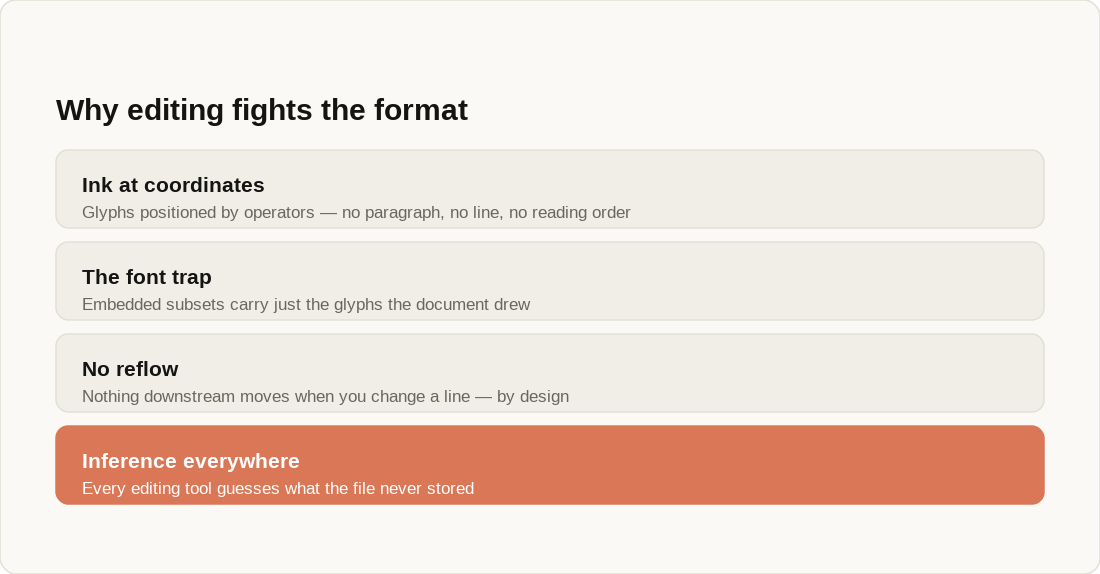
Open a PDF's internals and you won't find paragraphs, headings, or sentences as objects. You'll find a content stream: a sequence of operators, each a small command. For text, the pattern looks like this: pick a font and size, move the pen to coordinates (x, y), paint this string of characters. Then move again, paint again.
A paragraph in a Word file is one object with properties: font, spacing, indentation. Change the text and the paragraph reflows, and everything after it shifts to make room, because the file describes content and the layout is recomputed on the fly.
A paragraph in a PDF is a few hundred glyphs, each with a position attached. The line breaks aren't stored as decisions; they're baked into coordinates. There is no entity anywhere in the file that means "this is a paragraph" or "these lines belong together." If you insert a word in the middle, no part of the format knows what should move, because nothing in the format is a thing that moves. It's all just paint, already applied.
This is also why selecting and copying text from a PDF can behave strangely. The text you see is rendered glyphs; the text a copy operation returns comes from separate bookkeeping tables, and when those tables are missing or broken, you get the famous pasted-garbage problem.
The font trap
To look identical on a machine that doesn't have your fonts, a PDF embeds the fonts it uses, or pieces of them. Embedding is usually done as a subset: only the characters that actually appear in the document. A one-page letter set in Arial doesn't carry all of Arial, just the couple hundred glyphs on the page. This keeps files small, and it's why a document that uses an exotic typeface still opens correctly on your laptop.
Subsetting is a landmine for editing. Type a new character that wasn't in the original document, and the subset may simply not contain it. The editor then has to choose: substitute a different font for the new text, drop the character, or rebuild the font resources. Datalogics, whose PDF library sits inside a lot of commercial software, documents this directly: any text you add later is limited to the characters available in the subset. It's also why edited text sometimes switches fonts mid-sentence, and why a heavily edited PDF accumulates a weird pile of half-fonts.
There's a second trap layered on top. The mapping between the character codes in the file and actual Unicode text (called a ToUnicode table) is optional. When it's absent, the page looks perfect but the text underneath is unsearchable, uncopyable, or actively wrong. The picture is fine; the meaning is corrupted. That split between appearance and content is the PDF condition in miniature.
No reflow, and that's the point
Here's the part that gets framed as a design flaw and shouldn't be: PDF doesn't reflow because reflow would defeat its purpose. The entire value proposition is that the file looks the same everywhere, forever. A signed contract renders identically on the signer's machine, the counterparty's machine, the court's archive, and a printer in 2040. A magazine layout survives every device. If PDF text reflowed the way Word text does, it would render differently everywhere, and the format would have no reason to exist.
The rigidity and the fidelity are the same mechanism, viewed from opposite sides. "PDFs are hard to change" and "PDFs always look right" are one sentence. You don't get to keep the second and be annoyed by the first; that would be like complaining that a photograph is hard to reorganize.
So when a tool advertises "edit any PDF like a Word document," read it as a claim about what the tool can fake, not what the format contains.
Every editing tool is doing inference
Given a page that's really a stream of paint instructions, what does an editor actually do when you click on a line of text and type? It reconstructs. It looks at the geometry (which glyphs sit on the same baseline, which runs are close together, where the gaps fall) and infers: this cluster is probably a word, these words probably form a line, these lines probably form a paragraph. The format never said any of that. The editor guessed it from coordinates.
That inference is why every promise of Word-like editing comes with asterisks:
- Small, local edits work well. Fixing a typo, changing a date, swapping a price: the editor replaces glyphs within one run, repositions a few neighbors, and nothing structural needs to be true for it to succeed. Our guides to editing PDFs and editing PDF text directly stay inside this envelope on purpose.
- Structural edits are conversion in disguise. Insert a sentence into a full page and the text has nowhere to go: reflow would require a paragraph model the file doesn't have. So a real tool rebuilds the page's text from scratch, which is slower, approximate, and exactly the kind of work a converter does. The honest rule, which we unpack in the edit-or-convert decision guide, is that local fixes are editing and structural changes are reconstruction, and knowing which one you're facing before you start saves an hour.
- Extraction is inference too. When a tool pulls text out of a PDF for reuse, it's reading geometry back into a guess about structure, which is why results are clean from simple pages and mangled from complex ones. We treat those limits honestly in the text extraction guide.
None of this means editors are bad. It means the format gives them paint when they need paragraphs, so every editor is part surgeon, part archaeologist.
The blueprint and the building
If you take one idea from this article, take this one: PDF is not a bad document format. It is a different artifact. A Word file is a blueprint, a set of instructions from which a document can be rebuilt differently anywhere. A PDF is the building, finished, standing on its site.
Comparing their editability is comparing a blueprint to a building and declaring the building defective because it won't reflow. Buildings can be renovated: you can swap a door, patch drywall, repaint a room, and that's what PDF editing is, local work on a standing structure. But nobody erases a wall on a blueprint and expects the building to move. To change the building structurally, you either renovate room by room, carefully, or you take measurements of the whole thing, draw a new blueprint, and rebuild. That second path is conversion, and it's always a reconstruction: you can measure the walls, but you can't measure the architect's intent, which is why converted documents come back close and not identical.
This reframing changes the practical question too. "How do I edit this PDF?" is usually the wrong question. The right questions are: do I still have the blueprint (the source file), and how big is the change? If the source file exists, edit there and re-export; that path is always cheaper than surgery on the building. If it doesn't, decide whether your change is a door swap or a new wing.
The short version
PDFs are hard to edit because PDF is a print format that won: it records where ink goes, not what the document means. Fonts are embedded (often as subsets), positions are fixed, and paragraphs don't exist as objects. That design is what makes PDF trustworthy as a final form, and the same design is what makes your Tuesday afternoon difficult. Work with the grain: small edits in place, structural changes back through a flow format, and keep your source files, because the blueprint will always beat the building when change is on the menu.
The history behind this design is its own story: who invented the PDF, and why the 1991 decisions still hold.
Sources and further reading
- John Warnock, "The Camelot Project" (1991 memo, hosted by the PDF Association)
- ISO 32000-1:2008 (the PDF specification, free copy hosted by Adobe)
- Datalogics: managing subset characters when embedding fonts in a PDF
FAQ
Why can't I edit a PDF like a Word document?
Because a PDF stores the appearance of a document, not the document. Word stores paragraphs that reflow; a PDF stores glyph-drawing instructions at fixed coordinates. Editing tools have to work on those instructions directly, which is fine for small corrections and slow for anything structural.
Why does my text change font when I edit a PDF?
The original font was probably embedded as a subset containing only the characters used at creation time. If you type a character the subset doesn't include, the editor has to substitute another font. A missing ToUnicode table can also make text look perfect but copy out as garbage.
How do I make a PDF properly editable?
Go back to the source file (Word, Docs, InDesign) if it exists; that's the blueprint and editing there is cheap. If no source exists, small fixes can be made in place with a PDF editor, but structural changes mean converting to a flow format first, which is always a reconstruction.