Blog › Privacy & local processing
PDF/A explained: the format built to outlive you
Ordinary PDFs are good at surviving the next five years. PDF/A is the version of the format engineered to survive the next fifty. It is not a separate file type but a restricted subset of PDF, defined by the ISO 19005 series, with one goal: a file that renders identically decades from now, on whatever viewer exists then, without depending on anything outside itself. Courts, national archives, and e-invoicing systems ask for PDF/A for exactly that reason. This article explains what the standard actually requires, what the level labels mean, who demands it, and how to check or convert a file, including with LivePDF's own tools.
What PDF/A demands, in plain terms
The Library of Congress describes the family as aiming for device independence, self-containment, and self-documentation. Those three words translate into a short list of rules:
All fonts embedded. A regular PDF can point at a font installed on the viewing machine and hope for the best. PDF/A forbids that hope. Every font must travel inside the file, and the standard requires fonts that are legally embeddable for unlimited rendering. This is the rule that trips up the most files, because casual word-processor exports routinely leave standard fonts unembedded.
No encryption. An encrypted file needs a password, and a password is a dependency on a human memory. PDF/A files cannot be password-protected or access-restricted. If your document is protected, you remove the protection before archiving it.
No JavaScript or program launches. PDFs can carry scripts that fill forms, validate input, or open other files. Scripts are behavior, and behavior is exactly what ages badly; a viewer fifty years out will have no reason to run 2006-era Acrobat JavaScript, and a safe archive must not contain executable surprises anyway.
XMP metadata required. The file must describe itself in a machine-readable XMP packet: title, author, producer, and an identification of which PDF/A flavor it claims to be. This is the self-documentation part. An archivist in 2076 should be able to learn what the file is without opening its pages.
No external dependencies. No links that must resolve to content outside the file, no audio or video, no requirements that the viewer reach the network. Everything needed to paint every page is in the file.
Add device-independent color to that list and you have the essence of the standard: strip out every feature whose correct rendering depends on the outside world.
What the level labels mean
A PDF/A file carries a label like PDF/A-1b, PDF/A-2b, PDF/A-3b, or their "a" variants, and the labels compress two separate decisions into a few characters.
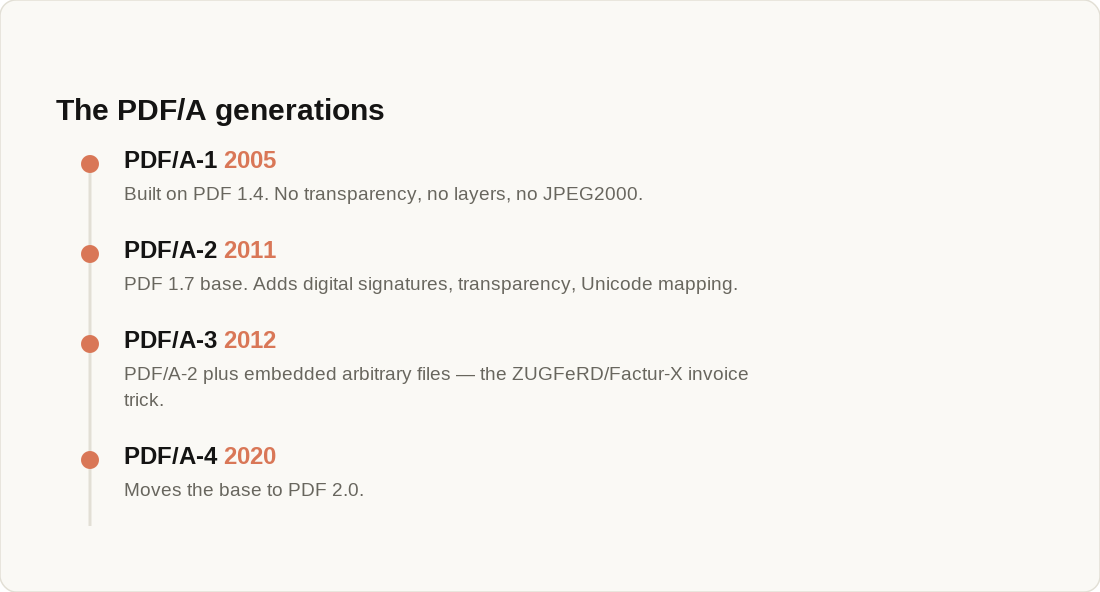
The number is the generation of the standard. PDF/A-1 (ISO 19005-1, published in 2005) is built on PDF 1.4 and is the most restrictive: no transparency, no layers, no JPEG2000 images. PDF/A-2 (2011) tracks PDF 1.7 and adds digital signatures, transparency, and optional Unicode mapping. PDF/A-3 (2012) is PDF/A-2 plus permission to embed arbitrary files, which is the trick behind ZUGFeRD and Factur-X electronic invoices: a human-readable PDF/A-3 with the machine-readable invoice XML riding inside it. PDF/A-4 (2020) moves the base to PDF 2.0.
The letter is the conformance level. B ("basic") guarantees that the pages render correctly and nothing more. A ("accessible") includes everything in B plus tagged structure and Unicode mapping, so the text can be extracted faithfully and screen readers can make sense of it; it is the same tagging machinery covered in accessible PDFs. U ("Unicode"), introduced with PDF/A-2, is the middle child: Unicode mapping for reliable text extraction without the full tagging requirement. A-1 never had a U level.
For most business documents, PDF/A-2b is the practical target. Reach for an "a" or "u" level when the text itself matters as text, and for PDF/A-3 when an invoice standard demands it.
Who actually requires this
The requirement usually arrives as a submission rule rather than a suggestion.
The US National Archives requires federal agencies to digitize permanent records to PDF/A; the 2023 revision of the transfer rules spells out which PDF/A versions and which embedded features it will accept for records destined for archival custody. In Germany, the judiciary's own coordinating bodies recommend PDF/A-2a as the standard format for court documents, as the country's courts moved to mandatory electronic case files for new proceedings in 2026. And since 2025, German and other European e-invoicing mandates have pulled millions of businesses into PDF/A-3 territory through ZUGFeRD and Factur-X, which require the invoice to be a PDF/A-3 with embedded XML.
The pattern is consistent: the parties who demand PDF/A are the ones promising to keep your document readable longer than any individual software vendor promises to exist.
How to check a file
A file that looks archived is not necessarily an archived file. A missing embedded font or one leftover JavaScript action invalidates conformance while the pages still display fine, so checking means validating the structure, not eyeballing the render.
The reference tool is veraPDF, an open-source validator built around the industry's own test corpus. It covers every part and conformance level of ISO 19005, reports pass/fail per rule, and is the tool to reach for when something important is riding on the answer.
LivePDF has a lighter version built in: open the command palette or the tools menu, find PDF standards, and run Check compliance.... Pick a level and you get a list of what does not comply, rule by rule, with page numbers where relevant. The report is honest about its scope: "This check covers the PDF/A rules that matter most in practice; a dedicated validator checks every clause." For a filing deadline, run veraPDF too. Both checks run entirely in the browser, so the file stays on your machine either way.
What conversion fixes, and what it breaks
LivePDF's Save as PDF/A... command, next to the check in the same menu, describes its own behavior in the dialog: "Fix what can be fixed automatically (color profile, metadata, fonts of the standard 14, scripts, annotation appearances) and report what remains. Password protection is not allowed in PDF/A."
What that means in practice:
Typically fixed automatically: the classic fourteen standard fonts get metric-compatible embedded substitutes; XMP metadata is written or repaired; stray JavaScript actions are removed; annotation appearances are regenerated; device color gets mapped to the standard profile. After conversion, a bar appears above the pages stating which PDF/A flavor the file now claims, and the tool warns that "Edits keep that claim only if the result still complies." Conformance is not a coat of paint; saving an unembedded font back into the file can silently lose it again.
Removed, by design: passwords and permission restrictions (the tool asks you to remove the password first), JavaScript behavior, multimedia, and any external content references. If your document relies on a scripted form to work, PDF/A is the wrong destination for the interactive copy; archive a flattened, inert version.
The visible exception: converting to PDF/A-1 flattens transparency, because PDF 1.4 had none. Documents with translucent highlights or watermarks can shift appearance slightly. The newer levels allow transparency, so if the preview looks wrong, use PDF/A-2b instead. Watch file size too: embedding fonts adds weight, and PDF/A is a preservation format, not a compression pass. That job belongs to reducing file size before archiving, not after.
One more habit worth forming: check what a converted file is, not just what it claims. The PDF version header and the claimed conformance level are independent facts, and encrypted inputs fail early, as covered in checking whether a PDF is encrypted.
The insight worth keeping
Here is the way to think about PDF/A that makes every individual rule obvious: it is less a format than a discipline. Nothing in ISO 19005 adds capabilities to PDF. Every requirement is a subtraction, and the criterion for the subtraction is always the same. Encryption? Depends on a password someone must remember. JavaScript? Depends on a scripting engine behaving as it did in 2012. Unembedded fonts? Depend on a machine that happens to have them. Audio and video? Depend on codecs. XMP metadata is the one addition, and it exists to record what was removed and who removed it.
Read any rule that way and you can predict what the standard will say about a feature you have never looked up. Does this feature assume something outside the file still exists and behaves? Then PDF/A forbids it. That is the whole standard, and it is why a fifty-year-old PDF/A file will open looking exactly the way it does today.
FAQ
Is PDF/A the same as PDF?
No. PDF/A is a restricted subset of regular PDF, defined by the ISO 19005 series. Every PDF/A file is a PDF, but not every PDF is a PDF/A: features that make long-term rendering unreliable, such as encryption, JavaScript, and unembedded fonts, are forbidden.
Which PDF/A level should I use?
PDF/A-2b is the sensible default for documents that only need to look right decades from now. Choose a level ending in 'a' (or 'u') when text extraction, copy/paste, or screen-reader access matters, and PDF/A-3 only when you need to embed non-PDF files, as ZUGFeRD and Factur-X e-invoices do.
Does converting to PDF/A change how my document looks?
Usually not. Conversion adds fonts, metadata, and color profiles, and strips JavaScript and encryption. The visible exception is PDF/A-1, which does not allow transparency, so translucent effects get flattened and can look slightly different. Always check the result before filing it.