Are PDFs Secure? 7 Myths That Get Documents Leaked
Are PDFs secure? The answer has two parts. The parts of a PDF that were designed as security features, like AES-256 encryption, work as designed. Almost every real-world PDF breach you have heard of happened somewhere else: in the workflow, in the tool someone picked, or in the gap between what a feature sounds like and what it actually does.
Below are the seven myths that cause most of the damage, with what really happens in each case.
Myth 1: PDFs are safe from malware
The myth. A PDF is a document, not a program. Opening one is like opening a photo.
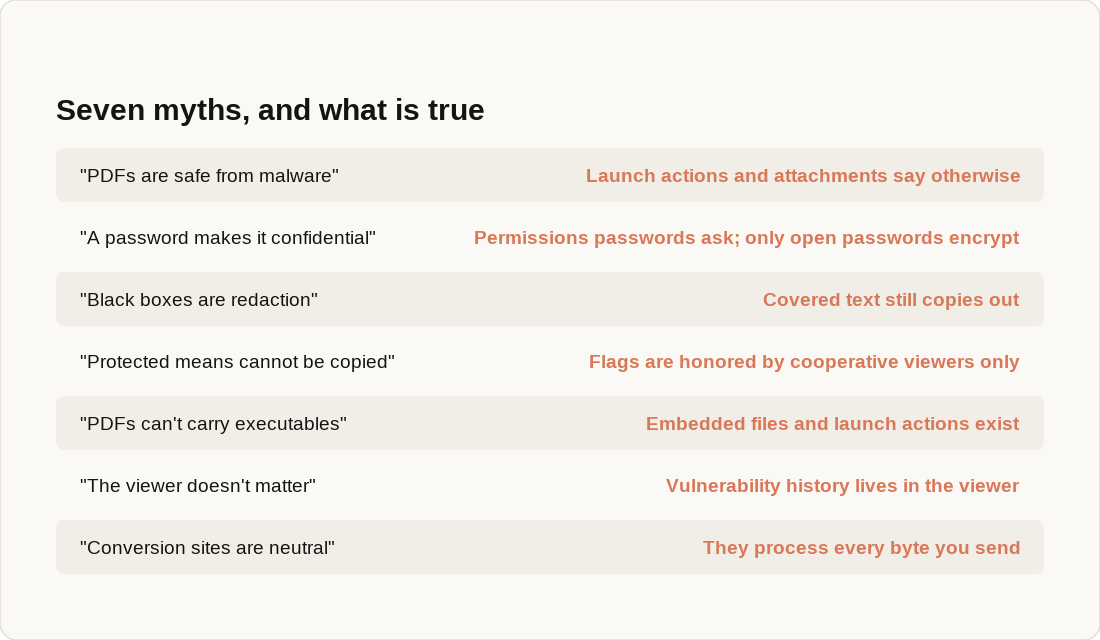
The reality. PDF is a container format, and containers can carry executable baggage. The spec includes a JavaScript engine (Acrobat's scripting API), embedded file attachments, and actions like /Launch that hand a file to the operating system. Each of those has been weaponized.
The evidence. CVE-2008-2992 is the classic teaching example: a stack buffer overflow in Adobe Acrobat and Reader 8.1.2 and earlier, triggered by a PDF calling the JavaScript function util.printf(). It allowed remote code execution and was later reused to drop ransomware (NVD entry). CISA's alert history covers the same ground: TA09-051A urged updating Acrobat and disabling JavaScript, and TA10-279A described malicious PDFs that gave attackers arbitrary code execution from being opened. None of this means every PDF is dangerous. It means "it's a PDF" was never a safety property.
Myth 2: a password makes a PDF confidential
The myth. I set a password, so nobody can read this file.
The reality. PDFs have two passwords that do completely different jobs. A user password (open password) genuinely encrypts the file: without it, the content cannot be decrypted at all. An owner password (permissions password) does no such thing. The file opens freely; the owner password only sets permission flags that ask well-behaved readers to restrict printing or copying. Tools like qpdf --decrypt can strip those restrictions without knowing any password, because there is nothing to decrypt past. Modern PDF 2.0 encryption is AES-256, which is strong, but only when the open password is actually set. The distinction matters enough that we wrote two guides on it: how to password-protect a PDF and how to tell whether a PDF is encrypted.
Myth 3: black boxes are redaction
The myth. I drew black rectangles over the sensitive parts, so those parts are gone.
The reality. A black rectangle is a drawing on top of text. The text is still in the file, still selectable, still searchable, and still readable by any text extraction. Real redaction removes the underlying content objects and then rewrites the file so nothing recoverable remains. Anything less is cosmetics.
The evidence. In November 2018, Paul Manafort's lawyers filed a court document with black boxes drawn over text in a word processor; reporters recovered the hidden passages by copy-paste (BBC). Back in 2005, readers pulled the text out from under the black boxes of the US Army's report on the Calipari shooting the same way (NPR). NIST's media sanitization guidance (SP 800-88) draws the same line in a different domain: covering data is not the same as clearing it. We catalogued more of these in famous black-box redaction failures, and how to redact a PDF properly walks through what real removal looks like.
Myth 4: "protected" means "cannot be copied"
The myth. The PDF is protected, so its permissions prevent copying and printing.
The reality. Permission flags are advisory by design. The format requires that a file with only an owner password be readable without one, which means any tool that ignores the flags can read and copy everything. Compliant readers honor the flags; nothing obliges other software to. Treat permissions as a polite request, not a control. That is fine for discouraging casual printing of a draft. It is not protection for anything confidential, because an honor system has no enforcement arm.
Myth 5: PDFs cannot contain executables or attachments
The myth. Email blocks .exe files, and PDFs are just pages.
The reality. Since PDF 1.4, the format has supported embedded file streams (standardized in ISO 32000 section 7.11.4): any file, of any type, attached inside the PDF and invisible to casual readers. That made "PDF" a convenient smuggling label precisely because attachment filters focused on executable extensions. A related, older trick is the /Launch action, which CISA warned about in 2010 after malware used PDFs to run executables on the host (Adobe guidance via CISA). Modern readers warn or block these by default, but the capability is part of the format, so the filter at your mail server is not the whole story.
Myth 6: the viewer does not matter
The myth. A PDF is a PDF; it behaves the same in every reader.
The reality. The reader is half of the security story. The exploit history above is mostly a history of Adobe Acrobat and Reader, because that is where the JavaScript engine and plugin surface lived. CISA's mitigations were reader-specific: keep the reader updated and turn off Acrobat JavaScript unless you need it (TA09-051A, TA12-101B, which also noted Acrobat's later sandboxing and architectural hardening). Meanwhile, the big browser PDF viewers render with their own engines and generally do not execute Acrobat's JavaScript at all, which removes that entire attack surface by omission. Where you open a document changes what it can do to you.
Myth 7: conversion sites are neutral infrastructure
The myth. An online converter is like a photocopier: anonymous, indifferent, nobody reads your file.
The reality. Uploading a document to a conversion site means sending it to someone else's server, where it is processed by software you cannot inspect and retained under policies you did not write. For a restaurant menu, that is a fine trade. For a contract, a medical record, or a court filing with personal identifiers, it is a trust decision disguised as a utility. This is why LivePDF runs entirely in your browser: the file never leaves the device, so the tool cannot leak what it never received. There is an honest tradeoff (very large files strain browser memory instead of a server's), but for confidential documents the local direction is the right one.
The pattern: workflow failures, not cryptography failures
Look across all seven myths and notice what is missing: not one of these failures involves broken encryption. AES held. Manafort's lawyers did not defeat cryptography; they exported a word-processing file with the text layer intact. The Calipari report did not fail at decryption; it was never truly redacted at all. Owner-password files do not leak because someone cracked AES-256; they leak because permissions were the wrong tool for a confidentiality promise.
PDF security failures are almost never cryptography failures. They are workflow failures: the wrong tool chosen for a promise it was never designed to keep. When you reach for a PDF security feature, ask what mechanism stands behind the promise. Removal beats covering, encryption beats permission flags, and local processing beats upload. The math is rarely the problem; the plumbing is.
Quick answers
Can a PDF contain a virus? It can carry hostile payloads: exploits against vulnerable readers, embedded executables, launch actions. Keep your reader updated and be careful with PDFs from unknown senders, which is the same advice CISA has given since 2009.
Is a password-protected PDF encrypted? Only if it uses an open password. A permissions-only password restricts nothing in the file itself; any capable tool can strip it.
Is a blacked-out PDF safe to share? Not unless a real redaction tool removed the content underneath and rewrote the file. If text can be selected under the box, it can be recovered.
FAQ
Can a PDF contain a virus?
Yes. PDFs can carry malicious payloads: exploits against vulnerable readers (like the CVE-2008-2992 buffer overflow), embedded executable attachments, and launch actions. Keep your PDF reader updated and treat PDFs from unknown senders with the same caution as any other attachment.
Is a password-protected PDF actually encrypted?
Only if you set an open password. A permissions-only (owner) password restricts nothing in the file itself: the document opens freely and capable tools can strip the restrictions without knowing any password.
Is a blacked-out PDF safe to share?
Not unless the black boxes were applied by a real redaction tool that removes the underlying content and rewrites the file. If you can select text underneath the box, the text can be recovered by anyone.