Blog › Privacy & local processing
Is there a maximum PDF file size? The real answer
Search "maximum pdf file size limit" and you get a wall of conflicting numbers: 25 MB, 100 MB, 2 GB, 10,000 pages. Most of those pages are wrong about the question. The PDF format itself has no meaningful size limit and no page limit at all. Every specific number you have ever been blocked by belongs to something else: an email provider, an upload portal, or a piece of software running out of memory. Knowing which wall you are actually hitting tells you which fix will work, and which ones waste an afternoon.
What the format actually says
A PDF is a sequence of numbered objects plus a cross-reference table that says where each one sits in the file. The specification, ISO 32000, does not declare a maximum file size or a maximum page count. Byte offsets are stored as integers, which in common 32-bit implementations caps files somewhere around 2 GB, and some viewers get sluggish well before that. But that is an implementation detail of particular programs, not a rule in the format. A PDF with four pages and a PDF with forty thousand are built from exactly the same parts; nothing in the file marks where a "big" PDF begins.
So when someone asks "how big can a PDF be," the honest answer is: bigger than anything you will personally write, and the limit that stops you is almost never the format.
The limits you actually hit
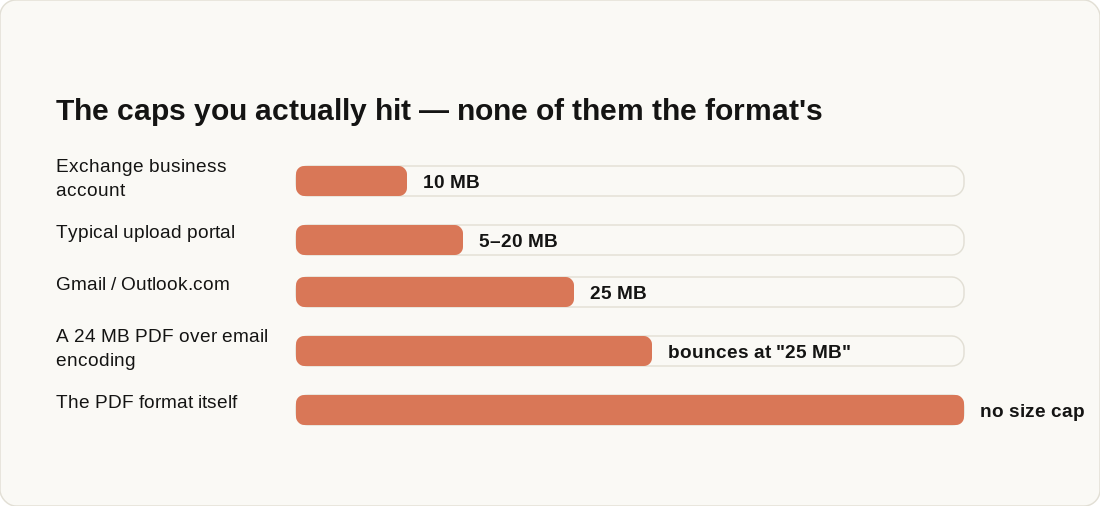
Email attachments. Gmail caps attachments at 25 MB per message (Google's own help page states the number and notes that anything bigger gets converted to a Drive link). Microsoft's limit is messier because it depends on account type: 20 MB for internet email accounts in classic Outlook, 10 MB by default on Exchange business accounts, 25 MB on Outlook.com, per Microsoft's support documentation. And the encoding email uses to carry binary files inflates them by roughly a third in transit, so a 24 MB PDF can bounce from a "25 MB" server. This is the single most common source of PDF size pain, and it is entirely a mail-system policy.
Upload portals. Government filing systems, grant applications, job application forms, insurance claims. These typically allow 5 to 20 MB per file, sometimes per entire submission. The NIH grant system, for one, publishes its limits and tells applicants to use image compression to stay under them. The portal does not care about your PDF; it cares about its storage budget and its reviewers' download times.
Tool memory. This is the one that surprises people working locally, where no server is involved. A browser-based editor keeps the document, its rendered pages, and its undo history in the memory of one tab. When we built LivePDF, we tested exports and set an honest ceiling at 100 MB; the check in the editor reads "This export would exceed the 100 MB PDF limit. Reduce file size before saving or downloading." A 100 MB PDF is not impossible as a file. It is just more than a browser tab can comfortably hold while rendering, editing, and rewriting it. Desktop applications with more memory go further and then hit their own walls. Even Adobe's documentation frames its optimizer around the reality that big files are slow files.
Patience. The softest limit and the most common. No error appears. The 400 MB scan bundle just takes ninety seconds to open, the pages render one at a time, and every save takes a coffee break. Functionally, a file nobody wants to open has already failed.
The one insight worth keeping
Here is the pattern behind all four walls: the "PDF size limit" you meet is almost always an email-era rule inherited by systems that no longer need it.
Attachment caps made sense in the 1990s, when mail servers stored messages on small disks and a single 30 MB message could clog a queue for everyone. Those numbers (20-something megabytes) then got copied by portal developers as a sensible-sounding default, and by tool vendors as a sanity check. Today's storage costs pennies per terabyte and transfers take seconds, but the defaults survived their justification. Which means the limit you are fighting is a policy decision, not a property of the format. Policies can be worked around; physics cannot. That distinction matters, because the workarounds are all cheap.
Getting under each limit
Match the fix to the wall.
For email and portals: compress. Most oversized PDFs are oversized because of images. A scan stored at 600 dpi when 150 is plenty carries sixteen times the pixels it needs, and full embedded fonts add weight that compression can strip. Downsampling images and recompressing streams routinely turns a 40 MB scan into a 4 MB file that looks identical on screen. The compression guide walks through what occupies the bytes and which lever cuts what. LivePDF's Reduce file size command does the standard pass without uploading anything.
For anything paginated: split. If a portal wants one file under 10 MB and your compressed PDF is 14, stop fighting the compressor and divide the document. Splitting into parts that each pass the limit, or extracting just the pages the recipient actually needs, is faster and preserves quality. The split guide covers the options, including how to pick split points so each part stays under a target size.
For scan-derived bloat: fix the source. Compression helps, but the deeper fix is scanning at sane settings in the first place: 150 dpi for on-screen documents, 300 dpi only for print. Grayscale instead of color for text pages. The scanned-PDF guide goes through those settings, which cut size at creation time rather than after the fact.
One caution on the way up: if your large PDF exists because you merged many documents, check for duplicated fonts and images first. Merging without cleanup keeps a copy of every shared resource from every source file, so a merge of ten reports can be several times the size of the sum of their parts. The merge guide explains how to avoid building a bloated file and then paying to shrink it.
The short version
The PDF format sets no page limit and no practical size limit. Every wall you hit belongs to something else: mail servers enforcing 1990s economics, portals copying mail servers, tools respecting the memory they actually have. Find the wall, then compress for size limits, split for count limits, and rescan when the source is the problem. The format was never the bottleneck; policy and memory were.
FAQ
What is the maximum size of a PDF file?
There is no limit set by the PDF specification itself. The ceilings people talk about (20 MB, 25 MB, 100 MB, 2 GB) all belong to other systems: email providers, upload portals, or the memory of the tool opening the file.
How many pages can a PDF have?
Unlimited. The format is a list of page objects, and nothing in the spec caps the count. Practical page limits come from software: a viewer may get slow or run out of memory on a 10,000-page file, but that is the program, not the format.
Why does my 30 MB PDF fail to upload if the format allows bigger files?
Whatever you are uploading to has its own size policy, usually inherited from email attachment limits of 20 to 25 MB. Compress the file, split it into parts, or share it through a link instead of a portal that counts megabytes.