Blog › Converting & extracting
Export PDF to Word, Excel, and PowerPoint: which and when
A PDF is a finished thing, but the work rarely is. Someone hands you a 40-page PDF and what you actually need is the table on page 12 as a spreadsheet, or the whole thing as a Word file you can redline. Exporting is how a finished document becomes a working one again, and the format you pick should match the work, not the file.
The formats, and what each one is for
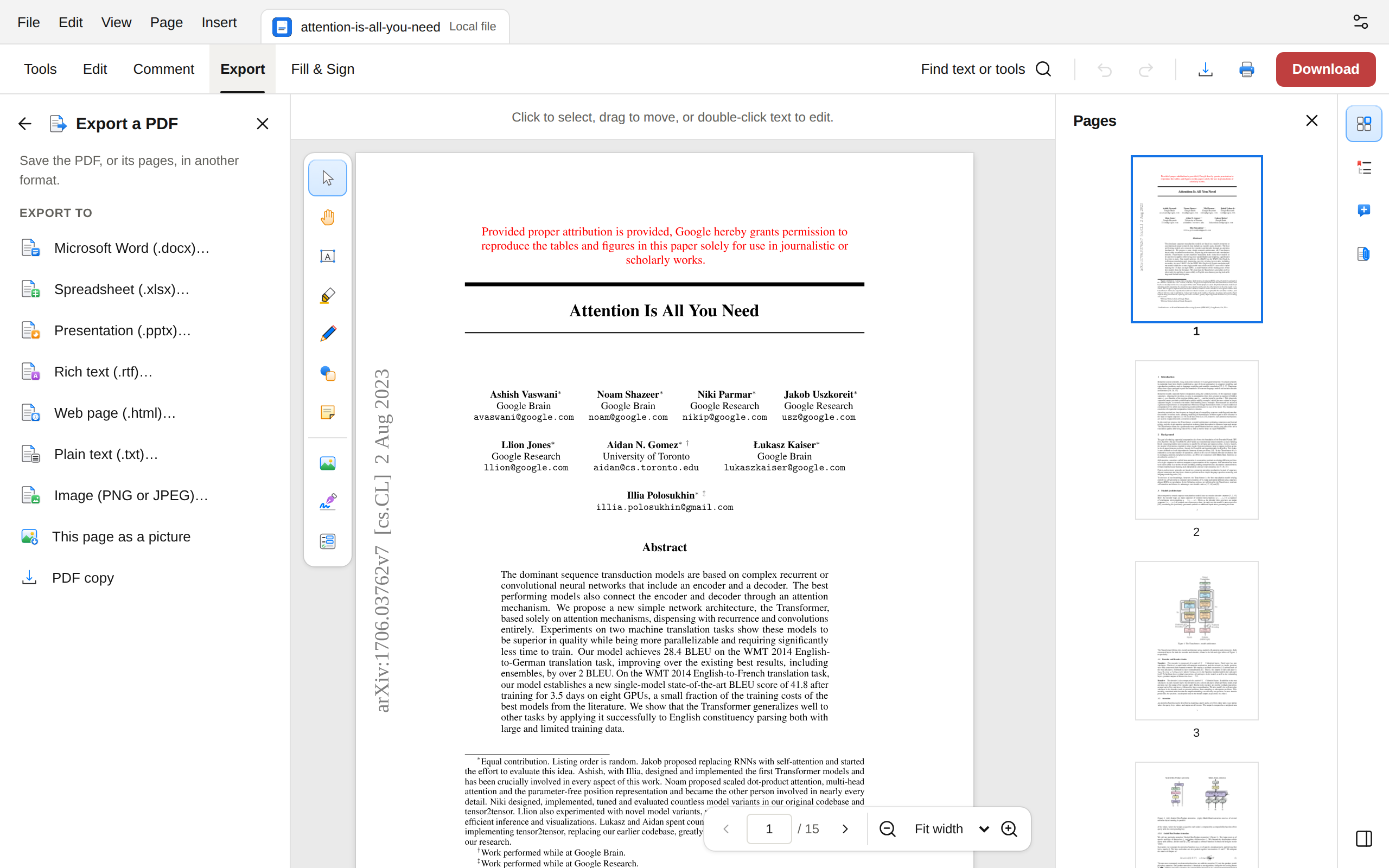
LivePDF exports to six: Microsoft Word (.docx)…, Spreadsheet (.xlsx)…, Presentation (.pptx)…, Rich text (.rtf)…, Web page (.html)…, and Plain text (.txt)…, all under Export a PDF → Export to, with an Image (PNG or JPEG)… option for page pictures. Everything runs in the browser; the file never uploads. Pick the dialog and you also choose which pages go - the whole document or just the section you need.
- Word (.docx) - the redline format. Export here when the next step is editing prose: contracts, reports, applications. The converter reconstructs paragraphs, headings, lists, and tables; the honest mechanics of that guess apply to every Office format equally.
- Excel (.xlsx) - the data format. Export here when the content is a table and the next step is formulas, sorting, or pivoting. A clean text table converts into real cells; a stylized or scanned table converts into cleanup work.
- PowerPoint (.pptx) - the presentation format. Useful when a PDF is deck-shaped (one idea per page) and you need slides back. Body text exports as text boxes; this is the format with the widest gap between what you get and what the original designer built.
- Rich text (.rtf) - the compatibility format. Older word processors and odd text pipelines that choke on .docx will usually take RTF. Formatting survives in a simpler form.
- Web page (.html) - for reuse online. Text and images come out web-ready; layout is approximate, which for a web page is usually fine.
- Plain text (.txt) - the zero-surprise format. Just the words, in reading order, no formatting at all. Ideal for quoting, diffing, indexing, or feeding a script. More on that route in extracting text from a PDF.
What converts well, per format
Single-column prose converts well to Word from almost any decent PDF. Multi-column layouts convert to Word with the columns merged in reading order, which may or may not be the order you wanted. Tables convert best to Excel and worst to PowerPoint. Scanned pages convert to nothing useful anywhere until they have been through OCR - the file has no text until you add one. Images inside any export come along at their stored resolution, which is why pulling them out separately is sometimes better; see extracting images.
Judge by content type, not hope. Every conversion is an inference from positioned glyphs, and the conversion-loss taxonomy explains exactly which inferences will be made about your document.
The ten-minute rule
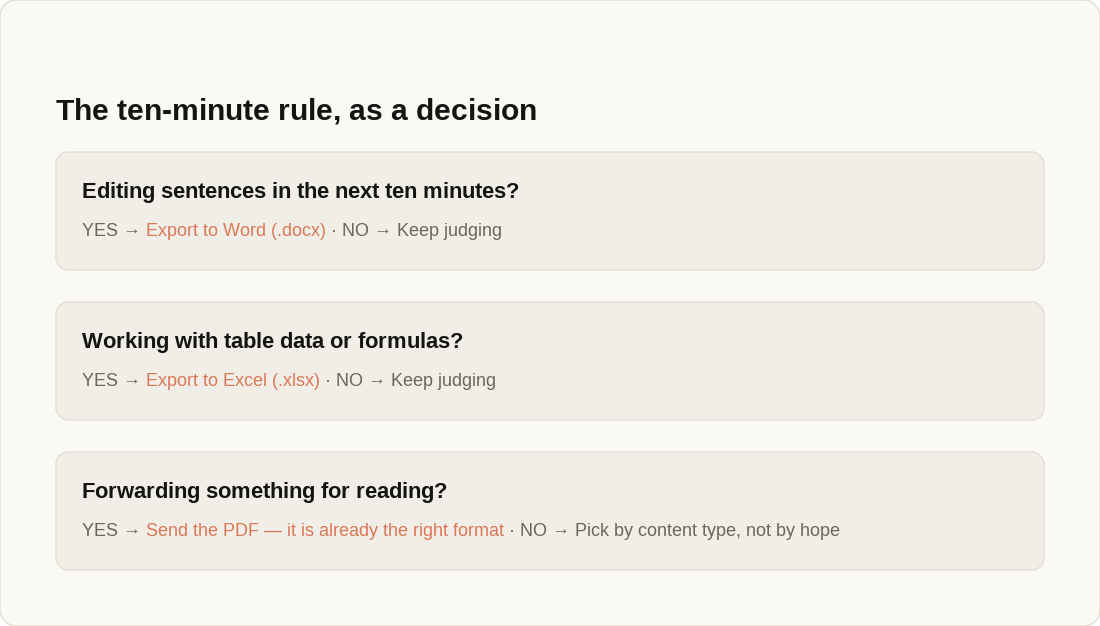
The whole decision, compressed: pick the export format by what you will do in the next ten minutes, not by what the file used to be. If the next ten minutes are editing sentences, export to Word. If they are building a formula, export to Excel. If they are forwarding something readable, do nothing - the PDF is already the right format, and exporting it will only make it worse.
The reverse also holds. A PDF that began life as a Word file does not export back into that Word file; it exports into a reconstruction. If the original .docx still exists, asking for it beats converting. The decision framework covers when conversion is worth it and how to check the result in one minute.
Picking the page range first
The export dialog takes a page range, and using it is the cheapest quality upgrade available. Converters make fewer inferences about twelve pages than about sixty. If you need the financial tables from a long report, exporting only those pages to Excel gives the table-detection a clean shot at the thing you care about, instead of letting it guess across a whole document of prose. The same logic applies in reverse: export the whole file when the whole file is the deliverable, and a section when it isn't. The pages you leave out cannot be misconverted.
A practical habit for recurring documents: note which pages held the tables last time. Quarterly statements, monthly reports, and court filings all repeat their own structure. Your second export of the same document shape should take seconds and produce a file you already know how to check.
RTF and HTML, briefly
The two formats people skip are the two that solve niche problems cleanly. RTF is the lowest-common-denominator word-processing format: if a client's ancient case-management system rejects .docx, RTF usually goes through, carrying basic bold, italics, and paragraph structure without the package complexity. HTML export is for reuse on the web - text and images come out as elements you can paste into a page or a knowledge base, with the layout approximated and the content intact. Neither is glamorous; both exist because "I need the text in another system" is a different job from "I need to edit this document."
Sources and further reading
- Microsoft: Opening PDFs in Word - what Word's own import tries to preserve.
- Adobe: Convert PDF to Word - the vendor framing of the same trade-offs.
- ECMA-376 (Office Open XML) - what a .docx/.xlsx actually is under the hood.
FAQ
Can I export a PDF to Excel and get a working spreadsheet?
If the PDF contains real tabular text, yes: the export reconstructs rows and columns into cells, and the result opens in Excel as a functioning grid. If the table was a picture, or the scan was never OCR'd, there is no text to export - run OCR first, and accept that heavily stylized tables need cleanup.
What is the difference between exporting to Word and exporting to plain text?
Word export rebuilds structure: paragraphs, headings, lists, tables, and images, so you can keep editing like a document. Plain text gives you just the characters in reading order - perfect for quoting, searching, or feeding a script, useless for layout.
Can I export only some pages of the PDF?
Yes. The export dialog lets you pick the page range, so a 60-page contract can become just the three pages you actually need in Word. Exporting a section also converts faster and gives the converter less layout to misread.