Self-signed certificate PDF signing: what it proves
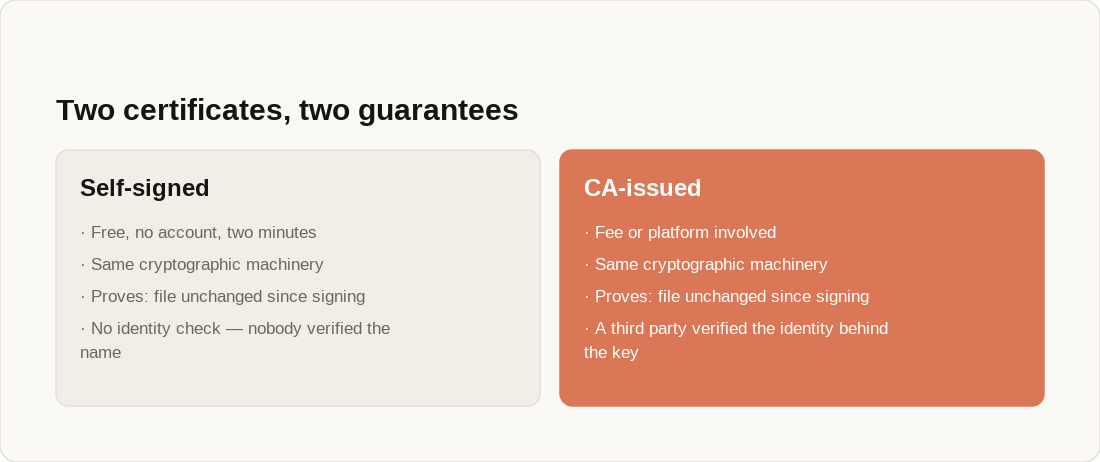
Self-signed certificate PDF signing is the two-minute version of cryptographic signing: you generate your own certificate, you sign the file, done. No fee, no account, no waiting on a certificate authority. The signature is real mathematics, the same machinery behind the expensive kind. What trips people up is what the mathematics covers. It proves the file has not changed since you signed it, and that the signature came from one specific key. It does not prove you are who the certificate says you are, because with a self-signed certificate, nobody checked. That split is the whole subject of this piece.
What a self-signed certificate actually is
A certificate signature has two parts. The private key is the secret that does the signing. The certificate is the public half: a small document saying "the holder of this key is named so-and-so." In the normal arrangement, a certificate authority (CA) verifies your identity and then signs your certificate, attaching its own reputation to your name. NIST's definition of a certificate is built on exactly that step: a key and an owner are bound only when the pairing is "digitally signed by a Certification Authority (i.e., a trusted party)" (FIPS 186-5).
A self-signed certificate cuts out the CA: your own key signs its own certificate. It is the cryptographic equivalent of writing your own letter of recommendation. The format is identical to a CA-issued one, and the name inside can be anything you type into a form. That is the full extent of identity verification in a self-signed certificate: none.
The bundle usually lives in a PKCS#12 file with a .pfx or .p12 extension: one password-protected container holding the private key and the certificate together. Adobe has supported creating these for years for what its documentation calls personal use and internal workflows, without a certificate authority (Adobe: create a self-signed digital ID). Acrobat calls the result a self-signed digital ID; OpenSSL people say self-signed; the mechanics are the same.
What the signature proves, and what it does not
When a signing tool signs a PDF, it hashes the entire file except the signature itself, then signs that hash with the private key. Two strong guarantees fall out:
Integrity. If one byte of the signed range changes afterwards, verification fails loudly: a retyped period, an appended page, even a metadata scrub.
Possession. The signature could only have been produced by whoever holds that private key. The key holder, full stop, and nothing wider.
What is missing is identity. The name inside a self-signed certificate was typed in by the person creating it. No registrar, employer, or authority confirms it. Anyone can produce a certificate that says anyone.
The reframe that makes self-signed certificates make sense: a self-signed signature's real product is tamper-evidence, not identity. The mathematics does not know or care what name the certificate carries; what it does, provably, is freeze the document at the moment of signing. Ask "is this exactly the file that was signed?" and the answer is certain. Ask "was it signed by the person named?" and the answer is a shrug. A large share of real signing questions are the first kind: Did my archived copy change? Is this the version we agreed on? Did anything slip in after the review round? For those questions, identity was never the issue, and the free certificate answers them completely.
It also does something a drawn signature cannot. A signature image records intent and appearance, with no binding to the file's bytes; a paste is indistinguishable from an original. The full map of signing routes, from drawn marks to certificate signatures to e-sign services, is in how to sign a PDF, with the drawn and typed route covered in signing a PDF electronically.
What the recipient sees
This is where self-signed signatures get their bad reputation, and the warning is widely misread. Open a self-signed PDF in Acrobat and the signature panel reports that the validity of the document certification is unknown, with the explanation that "the author could not be verified" (Adobe Community).
That warning is about identity, not tampering. It means "this certificate was issued by no one I trust," not "this file was modified." The two verdicts are separate checks, and honest software reports them separately. LivePDF's signatures panel, for example, distinguishes "the signer's identity is not trusted on this device" from "the document changed after it was signed." The first is a trust gap you can close. The second is the actual bad news.
Closing it is an out-of-band job. The standard workflow, recommended by university IT departments among others, is fingerprint comparison: the recipient opens the signature's certificate details and checks the fingerprint values against what the signer sends through another channel (University of Hawaii IT). If they match, the signature came from your key, and the recipient can trust that certificate from then on. CA-issued certificates are the industrial version of the same move: the CA did the identity checking once, and its membership in a trust list such as Adobe's AATL tells every recipient's software to accept the vouching automatically.
When a self-signed certificate is the right tool
Internal documents. Your colleagues already know who you are. The question they will have in a year is "did this change after Dana signed it," not "is Dana real."
Personal archives. Sign the final copy of anything you want to keep pristine: tax records, a thesis, closed contracts. The signature becomes a permanent, zero-maintenance change detector; if it still verifies, nothing touched that file, by accident or otherwise.
Sealing finished work. A certifying signature can lock a PDF against further changes, so any later edit visibly breaks the signature instead of silently surviving. Useful when "done" needs to mean done.
One caution about goals: a signature proves integrity, but it does not gate access. If the file needs to stay confidential, that is a password's job, not a certificate's (how to password protect a PDF). Signed and unencrypted is still readable by everyone.
When you need a CA-issued certificate or a platform
The moment the recipient does not know you, the identity half of the signature becomes the point. External contracts where a dispute is imaginable, filings to regulators, anything where a stranger must later answer "who signed this?": that is CA-issued certificate territory, with the certificate chaining to a recognized trust list and the vouching being somebody's actual business. Or use an e-signature platform, which layers identity checks and an audit trail on top of the signature; in the EU, the strongest eIDAS signature level is built specifically on qualified certificates from regulated trust-service providers.
One note about our own tool: LivePDF creates and validates certificate signatures, but it verifies no one's identity and is not a qualified-signature service. It is a signing tool. The identity question, self-signed or otherwise, has to be settled by something outside the software.
Signing with a self-signed ID in LivePDF
- Open the PDF at livepdf.app. The file stays in the browser, and so does the key you are about to make.
- Open the Use a certificate tool (in the Forms & Signatures group) and choose Digitally sign, then drag a box where the signature should appear.
- Create the ID. In the Choose a digital ID dialog, pick "Create a new digital ID," fill in your name, email address, and organization, choose a key type (RSA 2048-bit or ECDSA P-256), and set a password of at least six characters for the ID file.
- Save the .p12 file you get. The app generates the key pair locally and downloads the new ID as a .p12 file. That file plus its password is the identity: lose both and the signature can never be reissued, hand them over and someone else is you.
- Sign last. Add a reason, location, and contact details if you like, then Sign. The dialog itself puts it plainly: any later edit here will invalidate the signature, so sign last.
- Reuse the ID. Next time, choose "Use a digital ID file (.pfx or .p12)" and open the file you saved. Digital IDs live in the tab's memory only and nothing is stored on the device between sessions, so that .p12 is the only durable copy.
There is also a Certify (invisible signature) option, which signs the whole document without a visible box and can restrict what happens afterwards: form filling only, or no changes at all. To check signatures in any file, including someone else's, Validate all signatures runs the checks and the panel reports each verdict; the full walkthrough is how to verify a PDF signature.
The one-paragraph version
A self-signed certificate gives you the entire cryptographic half of signing and none of the identity half. It proves the document is unchanged and that one specific key signed it; it proves nothing about the name in the certificate, and recipients will see a warning saying so, which they can resolve by checking your certificate's fingerprint with you. For internal documents, archives, and sealing finished work, that is not a compromise; it is exactly the machinery the job needs. For strangers, contracts, and regulators, get a CA-issued certificate or a platform that verifies identity. The question worth asking before you choose is "which half do I actually need?" For did-this-file-change, the free certificate is enough. For who-signed-it, nothing self-signed will ever answer it.
Sources and further reading
- Adobe: create a self-signed digital ID
- NIST FIPS 186-5: digital signatures and certificate binding
- Adobe Community: "the validity of the document certification is unknown"
- University of Hawaii IT: confirming a self-signed certificate's fingerprint
Word count: 1,494
FAQ
Is a PDF signed with a self-signed certificate legally binding?
The cryptographic part works completely: any change to the file after signing breaks the signature. Whether a signature satisfies a given legal requirement depends on the jurisdiction and the document, and no certificate, self-signed or CA-issued, decides that by itself. What a self-signed certificate lacks is identity evidence; it does not show that the named person, rather than someone who borrowed the key file, did the signing.
How can a recipient trust my self-signed signature?
Out of band. Send them the certificate's fingerprint through a different channel (a phone call, a chat message) and have them compare it with the fingerprint shown in the signature's certificate details. If the values match, the signature came from your key, and they can mark the certificate as trusted. Without that step, the name in the certificate is a claim no software can check.
What is the difference between a .pfx and a .p12 file?
None. Both are PKCS#12 containers bundling a private key and its certificate behind one password. The .pfx name comes from Microsoft and .p12 from the standard itself; any tool that opens one opens the other.