OCR languages: ours is English-only. What to use instead
This belongs in the first sentence, so:: LivePDF's OCR reads English, and only English. If you arrived here looking for OCR languages beyond that, the honest answer is that you'll need a different tool, and this page exists to tell you which one and why we can't do it yet. Many sites bury this fact in a feature list and let you discover it after twenty minutes of gibberish. That's a bad way to treat someone holding a confidential document.
Why a browser OCR tool speaks one language
OCR isn't a dictionary lookup. It's a trained recognition model: a file that has learned, from millions of examples, what the letter shapes of a particular writing system look like. Every language gets its own model file, and the models are not small. English alone adds several megabytes to the download; the highest-accuracy models run to tens of megabytes each.
That's fine on a desktop, where Tesseract has been quietly installed with a hundred-odd language packs since forever. It's a problem in a browser tab. LivePDF's OCR runs entirely on your device, inside the tab, which is the whole point: your file never gets uploaded anywhere. But that architecture means every byte the OCR needs has to travel to your browser first. There's no server sitting in the middle that already has the models.
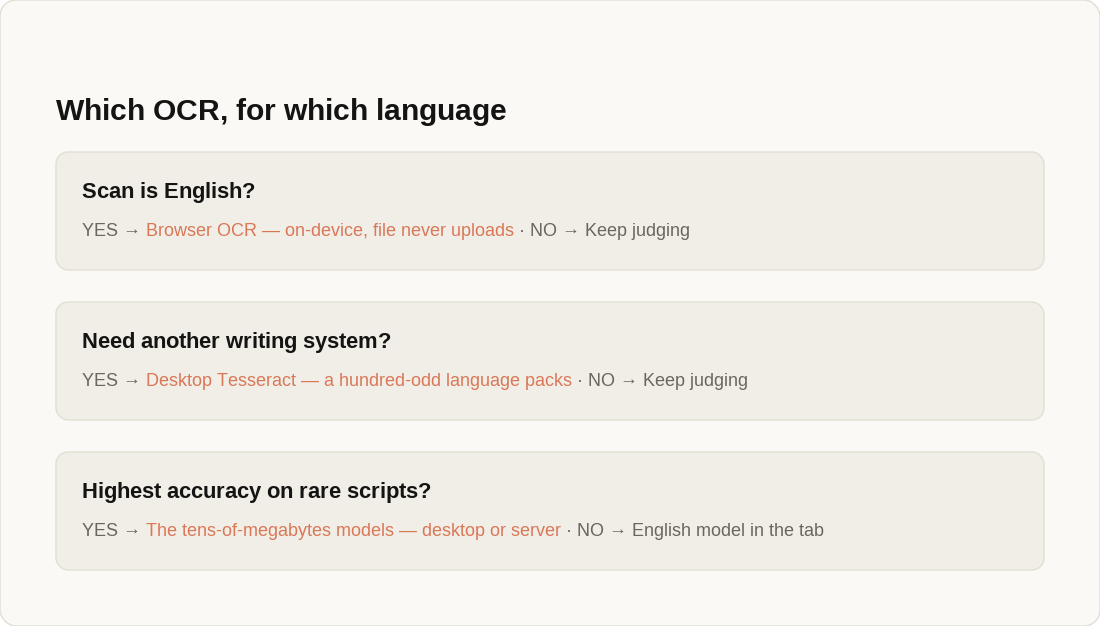
Which leads to the arithmetic is simple. Language support is fundamentally a download-size decision. Every language pack costs tens of megabytes, so a browser tool that bundled a hundred languages would be shipping something like a 4 GB page load. Nobody waits for that, and the tool stops being a tool. So we bundle the one model that covers the most documents, and we say so plainly instead of pretending the option list goes on forever.
What English-only means in practice
The failure mode is specific, and it's worth knowing before you burn time on it. Tesseract's English model knows the shapes of unaccented Latin letters, plus English punctuation. Feed it a page of French and two things happen:
- Accented characters garble. É, ü, ç, ñ have no entries in an English model, so they come back as whatever unaccented letter looks closest, or as noise. "Déclaration" tends to arrive as "Declarati on" or "Declaraton". Every accent is a small coin flip, and a page of Portuguese is a few hundred coin flips.
- Unaccented words can still work. A Spanish sentence with the accents stripped is often readable, so short, clean, mostly-accent-free text sometimes survives. Don't count on it for anything you'll quote, file, or search, because the text layer is silently wrong in ways Ctrl+F won't warn you about. The OCR text layer is what search and copy-paste actually read, and a wrong layer is worse than no layer.
Non-Latin scripts (Arabic, Chinese, Hindi, Cyrillic, Greek) aren't a degraded case. They're a zero. The English model has nothing to say about those letterforms at all.
Free alternatives that do handle other languages
Two good ones, and they make opposite trade-offs.
OCRmyPDF: local, private, needs an install
OCRmyPDF is a free, open-source command-line tool that adds a searchable text layer to an existing PDF, same architecture as we described in the make-a-PDF-searchable guide. It's built on Tesseract, and Tesseract's language data files cover more than a hundred languages. You install the language packs you need through your package manager, then name the language on the command line:
sudo apt install ocrmypdf tesseract-ocr-deu   # tool + German model (Debian/Ubuntu)
ocrmypdf -l deu vertrag-scan.pdf vertrag-searchable.pdf
The -l flag takes the three-letter code from the language list (fra, spa, jpn, ara, and so on), and you can combine codes for mixed-language documents. Everything runs on your own machine. The file never leaves it, which is the same privacy property LivePDF has; you're just paying for it with a one-time setup cost instead of zero install.
Google Docs OCR: zero install, but it's an upload
If you don't want to touch a terminal, Google's Drive does OCR for free. The steps: upload the image or PDF to Google Drive, right-click it, and choose Open with → Google Docs. Google's own help page documents the whole flow, and it works for PDFs and common image formats alike. Google recognizes the text and hands you back an editable document. The supported language list is long enough to include everything from Vietnamese to Thai to simplified and traditional Chinese, and the quality is genuinely good on clean scans.
It has limits worth knowing before you bother: files up to 2 MB, text at least 10 pixels tall, pages right-side up, reasonably standard fonts and even lighting. Skewed phone photos of a crumpled receipt will disappoint.
The trade-off is the one you'd expect: Google Docs OCR is a cloud service. Your document is uploaded to Google's servers, processed there, and stored in your Drive as a Google Doc. For a restaurant menu or a public journal article, that's a non-issue. For a client contract, a medical record, or anything covered by an NDA, "it was convenient" is not the answer you want to give when someone asks where the file went.
Which one, when
It's a short decision tree:
- English scan, no patience for uploads. LivePDF. It's local, free, and handles the case we actually cover.
- Any other language, document is sensitive. OCRmyPDF with the right language pack. Local processing, a hundred-plus languages, no upload. The install is ten minutes once.
- Any other language, document is not sensitive, no install allowed. Google Docs OCR via Drive. Fast, free, competent, and your file takes a trip to someone else's computer.
That third column is the real cost of our English-only limit. For non-English confidential documents, the private option currently requires a command line, and the easy option requires trusting a cloud. We'd rather ship that trade-off than pretend a language dropdown exists. If your documents are English, though, the tool that keeps every byte on your device is right here.
FAQ
Why doesn't LivePDF support other OCR languages?
Because every OCR language is a separate recognition model, and each one weighs megabytes. LivePDF's OCR runs entirely inside your browser tab, so all of it has to download to the tab. Bundling a hundred languages would turn a fast-loading web page into a multi-gigabyte one, so we ship the single model that covers the most people.
Can I OCR a French or Spanish PDF with LivePDF anyway?
You can try, and simple unaccented text sometimes survives. But the English model doesn't know accented letter shapes, so words like déclaration or año tend to come back mangled. For reliable results in other languages, use OCRmyPDF with the right Tesseract language pack, or Google Docs' built-in OCR.
Is Google Docs OCR safe for confidential documents?
Not in the same way a local tool is. Google Docs OCR works by uploading your file to Google's servers, so the document leaves your device. If the scan is confidential, run OCRmyPDF on your own machine instead: it supports over a hundred languages and processes the file locally.